This is my final.
Special thanks to Ben, Steven and Angela!!

Showing posts with label DSDN 142 - Creative Coding.. Show all posts
Showing posts with label DSDN 142 - Creative Coding.. Show all posts
Friday, 14 October 2011

Monday, 10 October 2011
DSDN 142 - Creative Coding.
This was when my application was mostly finished.
I designed my helic to have rotating lines working as helices and the ellipse expanding and shrinking depending on if it was raining on it or not.
First I created a new application to have a better understanding of the rotating command and came up with this result.
Then after going through some issues with Ben and learning about the pushMatrix and popMatrix commands i was finally able to develop my helic.
I designed my helic to have rotating lines working as helices and the ellipse expanding and shrinking depending on if it was raining on it or not.
First I created a new application to have a better understanding of the rotating command and came up with this result.
Then after going through some issues with Ben and learning about the pushMatrix and popMatrix commands i was finally able to develop my helic.
DSDN 142 - Creative Coding.
My new idea was to add lightnings to the rain and give it a thunderstorm effect. Works really well, I just had to work on the lightning flashes now. I also added a new object which I called the helic (helicopter) and would develop it so it would work as an interaction and make sense in the given scenario.
DSDN 142 - Creative Coding.
The next step was to add the wind that I had planned in the past and a new background for when the rain was on. Also, Ben made me realize that the bouncing rectangles I had been working on didnt make much sense in the given the scenario, so I started working on different ideas.
This is how it looked like.
This is how it looked like.
DSDN 142 - Creative Coding.
I got so focused on creating the visuals that I nearly forgot to add sound at one point. I was time I started adding sounds that would give my application a bigger effect.
Ben firstly gave us this simple code on how to put sound into your app, and then I started to work from there.
I added a gradient background to have prettier matching colours.
I changed the rain and used lines instead of points and also created a fading trail by adding a code that adds a new layer to the application.
And of course, the rain sound.
Ben firstly gave us this simple code on how to put sound into your app, and then I started to work from there.
I added a gradient background to have prettier matching colours.
I changed the rain and used lines instead of points and also created a fading trail by adding a code that adds a new layer to the application.
And of course, the rain sound.
DSDN 142 - Creative Coding.
The next idea was to have rain on a specific clouds depending on the position of the mouse and to have the closest clouds to only rain a little bit.
Not exactly the way I wanted yet but I was getting somewhere.
Not exactly the way I wanted yet but I was getting somewhere.
DSDN 142 - Creative Coding.
After I was managing to use Class in processing I decided to make the clouds rain and give a grey colour to the clouds that were raining.
I first did a small research on how I would draw the rain and decided to just start off with points.


Thats how it first looked like.
I first did a small research on how I would draw the rain and decided to just start off with points.


Thats how it first looked like.
DSDN 142 - Creative Coding.
Then after seeing that I understood arrays very well, Ben tought me how to use Class and create objects and showed me how much that could help me in any application, making everything much easier.
We created this application along the learning processing.
Then he sent me off use the things I learned in my own application.
Then I made a class for the clouds and a class for the bouncing rectangles.
We created this application along the learning processing.
Then he sent me off use the things I learned in my own application.
Then I made a class for the clouds and a class for the bouncing rectangles.
DSDN 142 - Creative Coding.
However, I was having trouble in creating clouds that wouldnt change their shapes everytime they came on and off the screen.
I asked for Ben's help on that matter and he was happy to help. Firstly, he made sure I really understood how arrays work and asked me to create an array of ellipses that would have different speeds.
Then he presented to me the idea of having an array within an array and that it would solve the problem.
And so we worked on that idea and came up with this result out of the last example.
I asked for Ben's help on that matter and he was happy to help. Firstly, he made sure I really understood how arrays work and asked me to create an array of ellipses that would have different speeds.
Then he presented to me the idea of having an array within an array and that it would solve the problem.
And so we worked on that idea and came up with this result out of the last example.
DSDN 142 - Creative Coding.
Then I started drawing the clouds that would have the boxes bouncing on them. I wanted to make the clouds moving and that I would add a wind sound to it in the future.
So I started researching clouds' different forms and I came to the conclusion that the best idea (easiest and most effective) would be to draw them using ellipses in arrays.


So I started researching clouds' different forms and I came to the conclusion that the best idea (easiest and most effective) would be to draw them using ellipses in arrays.


DSDN 142 - Creative Coding.
I decided that instead of having boxes jumping straight from a cliff I would have the boxes jumping on clouds and dropping out of them.
So I started with the basic idea of having a bouncing rectangle and working out how gravity works.
So I started with the basic idea of having a bouncing rectangle and working out how gravity works.
DSDN 142 - Creative Coding.
These were my very first ideas.
I came up with boxes jumping off a cliff, a fire that would create different burning sounds, guitar strings and a small grid of rectangles hodings small boxes that would make a sound.
After discussing the best option with Stevem I decided to stick with the idea of boxes jumping off the cliff but I would change a few things around.

I came up with boxes jumping off a cliff, a fire that would create different burning sounds, guitar strings and a small grid of rectangles hodings small boxes that would make a sound.
After discussing the best option with Stevem I decided to stick with the idea of boxes jumping off the cliff but I would change a few things around.

Tuesday, 6 September 2011
DSDN 142 - Creative Coding.
I have worked on the development of my interactive application and I have came to my final script. It is looking much better than before now that the arrow actually hits the very center of the bullseye target. I also added a new effect to the target. When it goes into the direction of the arrow, it gets pulled back if its hit by the arrow.
This is how it is looking like:
This is how it is looking like:
Monday, 5 September 2011
DSDN 142 - Creative Coding.
I'm still developing my bulls-eye interaction but I think it has improved a lot. I've added a lot of different mouse functions that will result into more entertainment.
Here it is:
Here it is:
Friday, 2 September 2011
DSDN 142 - Creative Coding.
I have been developing my bullseye concept.
I have changed the line so it actually looks like an arrow.
The main goal now is to perform a change when the arrow hits the very middle of the target.
For now, it will only change colour, and it will keep changing as you hit the centre of the target.
I will, in the future, implement other changes to have more interaction other than control. I will make it more abstract.
This is how it looks like so far:
I have changed the line so it actually looks like an arrow.
The main goal now is to perform a change when the arrow hits the very middle of the target.
For now, it will only change colour, and it will keep changing as you hit the centre of the target.
I will, in the future, implement other changes to have more interaction other than control. I will make it more abstract.
This is how it looks like so far:
DSDN 142 - Creative Coding.
This post reflects on my first concepts of the second project.
This was my very first result that I got out of one of the tutorials. It has a similar script as the one given but it is changed around. I has worked as another inspiration.
I decided to start off on the basic idea of a rotating ellipse. I don't intend to have forms, I have the goal to create something very abstract and unexpected. But we all start off on basic ideas. This is how it might work.
Out of the rotating ellipse, I created this interactive application where it changes colour as you move the mouse from one side of the screen to the other. I involves a lot of control as well, which is a bad thing when you wish to creative something very interactive, however, I plan to change it around so the abstractness will take over control.
The other day I had the idea of creating a bullseye using the ellipse and then have an arrow to create a relationship between the bullseye target and the arrow.
This is my first concept.
I now have a line which will supposedly represent the arrow moving towards the bullseye ellipse. In addition, everytime you shoot the arrow its speed slowly increases.
This was my very first result that I got out of one of the tutorials. It has a similar script as the one given but it is changed around. I has worked as another inspiration.
I decided to start off on the basic idea of a rotating ellipse. I don't intend to have forms, I have the goal to create something very abstract and unexpected. But we all start off on basic ideas. This is how it might work.
Out of the rotating ellipse, I created this interactive application where it changes colour as you move the mouse from one side of the screen to the other. I involves a lot of control as well, which is a bad thing when you wish to creative something very interactive, however, I plan to change it around so the abstractness will take over control.
The other day I had the idea of creating a bullseye using the ellipse and then have an arrow to create a relationship between the bullseye target and the arrow.
This is my first concept.
I now have a line which will supposedly represent the arrow moving towards the bullseye ellipse. In addition, everytime you shoot the arrow its speed slowly increases.
Monday, 8 August 2011
DSDN 142 - Creative Coding.
Today in the tutorial we (students) had the task to explore and research about interactions. I went to OpenProcessing.org and firstly focused on trying to understand the difference between interaction and control.
Here are some examples of my research:
These first two applications are mainly control. However, they did trick me for a moment. The reason is because even though is little, there still is a little bit of interaction. On the first one it is about dragging the mouse and painting specific spaces. The reason it is not really interaction is because there is no abstractness, randomness nor an unexpected happening. There is a set out structure for you to paint on and once you do, it gets boring. The second application is not interaction for the same reason. You do have to tell the computer to move the fire around, however, it corresponds to your orders exactly the way you would expect to. Thus, it gets boring quite easily.
This application is quite an interesting interaction. It got me playing with it for a little while in class and as I opened the application again a few minutes ago, I cought myself playing with it for a little while again.
Out of the interactive applications I researched, this was my favorite. Even though you have absolute power over the way the lines move, it always happens differently and can be changed quite easily. There are also options of modifying a few properties of the design and making it look different. I will use some of this coding on my own project if I don't find it extremely hard.
These are two other applications that I enjoyed interacting with and will use as inspirations.
Here are some examples of my research:
These first two applications are mainly control. However, they did trick me for a moment. The reason is because even though is little, there still is a little bit of interaction. On the first one it is about dragging the mouse and painting specific spaces. The reason it is not really interaction is because there is no abstractness, randomness nor an unexpected happening. There is a set out structure for you to paint on and once you do, it gets boring. The second application is not interaction for the same reason. You do have to tell the computer to move the fire around, however, it corresponds to your orders exactly the way you would expect to. Thus, it gets boring quite easily.
This application is quite an interesting interaction. It got me playing with it for a little while in class and as I opened the application again a few minutes ago, I cought myself playing with it for a little while again.
Out of the interactive applications I researched, this was my favorite. Even though you have absolute power over the way the lines move, it always happens differently and can be changed quite easily. There are also options of modifying a few properties of the design and making it look different. I will use some of this coding on my own project if I don't find it extremely hard.
These are two other applications that I enjoyed interacting with and will use as inspirations.
Friday, 5 August 2011
DSDN 142 - Creative Coding.
I have come to the end of my development. These are my 8 final compositions of process coding. The plan was to go from complete structure into complete noise and then from noise to structure again. I used ellipse animantions to achieve my goal.
In this animation I wanted to have as much structure as possible. I used codes for structuring colours, the ellipses size, the triangles in the very middle, and how they change colour.
As the next iterations follow, I tried to structure scarcity and noise at the same time. In this composition I set a couple of the ellipses structure to be in random spots throughout the page.
In this composition I wanted to show less structure and more noise by adding more randomness with the ellipses.
The purpose of this iteration is to show a very noisy composition with little structure.
When doing the code for the animation above, I added as much randomness as possible, however, limiting the colour randomness. The purpose was to show complete noise and blur.
This composition was created to show that there is structure even behind noise. I tried to accelerate the ellipses and got a very structured pattern.
On this one I started playing with the structure I had by exploring noise.
This composition is also an iteration of noise exploration. I found very interesting how it is almost impossible to notice this structure was made out of randomized ellipses.
In this animation I wanted to have as much structure as possible. I used codes for structuring colours, the ellipses size, the triangles in the very middle, and how they change colour.
As the next iterations follow, I tried to structure scarcity and noise at the same time. In this composition I set a couple of the ellipses structure to be in random spots throughout the page.
In this composition I wanted to show less structure and more noise by adding more randomness with the ellipses.
The purpose of this iteration is to show a very noisy composition with little structure.
When doing the code for the animation above, I added as much randomness as possible, however, limiting the colour randomness. The purpose was to show complete noise and blur.
This composition was created to show that there is structure even behind noise. I tried to accelerate the ellipses and got a very structured pattern.
On this one I started playing with the structure I had by exploring noise.
This composition is also an iteration of noise exploration. I found very interesting how it is almost impossible to notice this structure was made out of randomized ellipses.
DSDN 142 - Creative Coding.
My first inspirations came from a youtube tutorial that briefly teaches you how to use and manipulate loops. From the simple example of the animation of an ellipse going across the page and coming back to its starting point, I was able to create my eight different iterations. Not only by using the loop, of course, but also applying all my knowledge to the script I was composing.
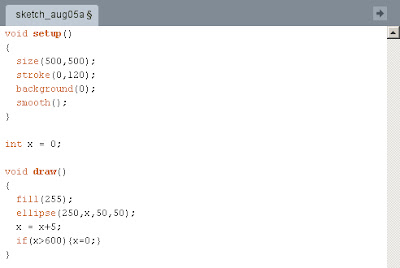
The script is very simple. I created an ellipse loop to illustrate. The "draw" part will constantly repeat itself. And even before that I had to create a variable ("x") that will make the ellipse move and gave it the value of "0". When determining where the ellipse would have to be located on the page, I added the "x" variable and just below I wrote "x+5". This means that every time the file loops, 5 will be added to X and the ellipse will be moving towards the end of X (which goes from 0-500) on the page. The "if" command is to make the ellipse go back to its starting point once it has reached the end of the page.

This is how it looks like. The motion cannot be seen, of course, since it is not an animation.
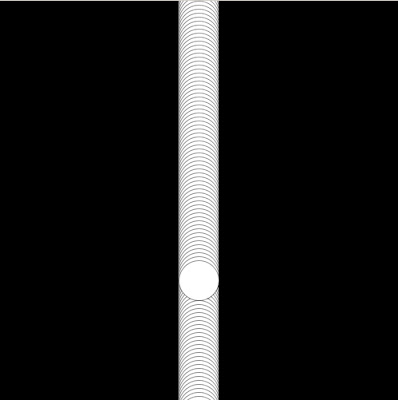
This script leaves a trail of ellipses as it goes and the only change made was to add the background to Draw instead of the Setup and a considerably transparent stroke.
Here is the youtube tutorial video I used for learning how to do the whole process, I found it very useful.
Sunday, 31 July 2011
DSDN 142 - Creative Coding.
As our task for this week Ben told us to create 4 processing files that will explore the relationship between structure and noise. Nonetheless, he also told us to do so using variables. I have spent many hours playing around with OpenProcessing and I have come to my final codings.
My creations are all animations. For this reason, they will look differently from the original in this blog.
In this processing file I created a very nice structure using 14 different variables. I tried to use variables as much as possible and learned a lot doing so.

On this one I started adding a little bit of randomness creating a lack of structure in some parts of it, where the position of the ellipses has no specific order.

I found that noise can be easily related to randomness. The reason is because randomness is basically lack of structure. In this picture ellipses are created at random spots with random colours and thus, creating a little bit of noise.


Cheers,
Julio Inglez.
Subscribe to:
Posts (Atom)